
Can Kittl Creative Agent really take a simple product idea and turn it into designs, mockups, listing images, promotional videos, and marketing content? Yes, it can. I tested it myself, and the entire experiment cost me 1,031 AI tokens. But getting there wasn’t always pretty. I wanted to see how this new AI design assistant would perform when someone approached it with a real project instead of a bunch of random prompts. So I gave it a challenge: create a coffee mug design featuring my turtle mascot, Sheldon, with the phrase “Turtley Over It.”
Then I wanted to see how far Creative Agent could take that idea. Could it help me develop the design, create realistic product mockups, produce Etsy listing images, generate a promotional video, and even write some listing copy? And more importantly, could someone unfamiliar with AI prompting use it successfully?
I recorded the entire experiment, tracked my token balance, and let things unfold without knowing exactly what would happen next. Some of the results impressed me. Others had me ready to throw my laptop across the room. I didn’t do that, of course. Sheldon would probably throw something back, lol.
What Is Kittl Creative Agent & How Does It Work?
Kittl Creative Agent is a conversational AI design assistant that helps turn ideas into finished creative assets. Instead of choosing every AI model or writing complicated prompts yourself, you describe what you want in an easy conversational style, answer questions, and guide the results through a chat interface. It’s available inside the AI Studio section of Kittl. You can use it to create product graphics, marketing images, mockups, promotional videos, illustrations, and other creative content.
What makes it interesting is the conversational approach. You don’t necessarily have to start with a perfectly written prompt. You can explain an idea, let Creative Agent ask questions, review its suggestions, and refine things as you go. For my experiment, I intentionally tried not to overthink the initial prompts. Normally, I’m pretty specific when working with AI tools. But this time I wanted to approach Creative Agent like someone who had an idea but didn’t necessarily know how to turn it into a finished product. That meant letting it do some of the creative directing. And boy howdy, did it have some ideas, lol.
Can Creative Agent Turn a Simple Idea Into a Product Design?
Yes. Creative Agent took my rough idea for a grumpy turtle mug and produced four design concepts after asking a few questions. It was a promising start, especially considering how little information I provided. My original concept was pretty simple. I wanted a disgruntled turtle design with the phrase “Turtley Over It.” I simply told Creative Agent what I had in mind, but I didn’t tell it everything I had in mind. For the test, I wanted it to earn its keep, lol.
Creative Agent asked about the design style, intended audience, and how many options I wanted. I selected a grumpy comic-book style, chose turtle lovers as the audience, and requested four designs. And that’s exactly what I got.
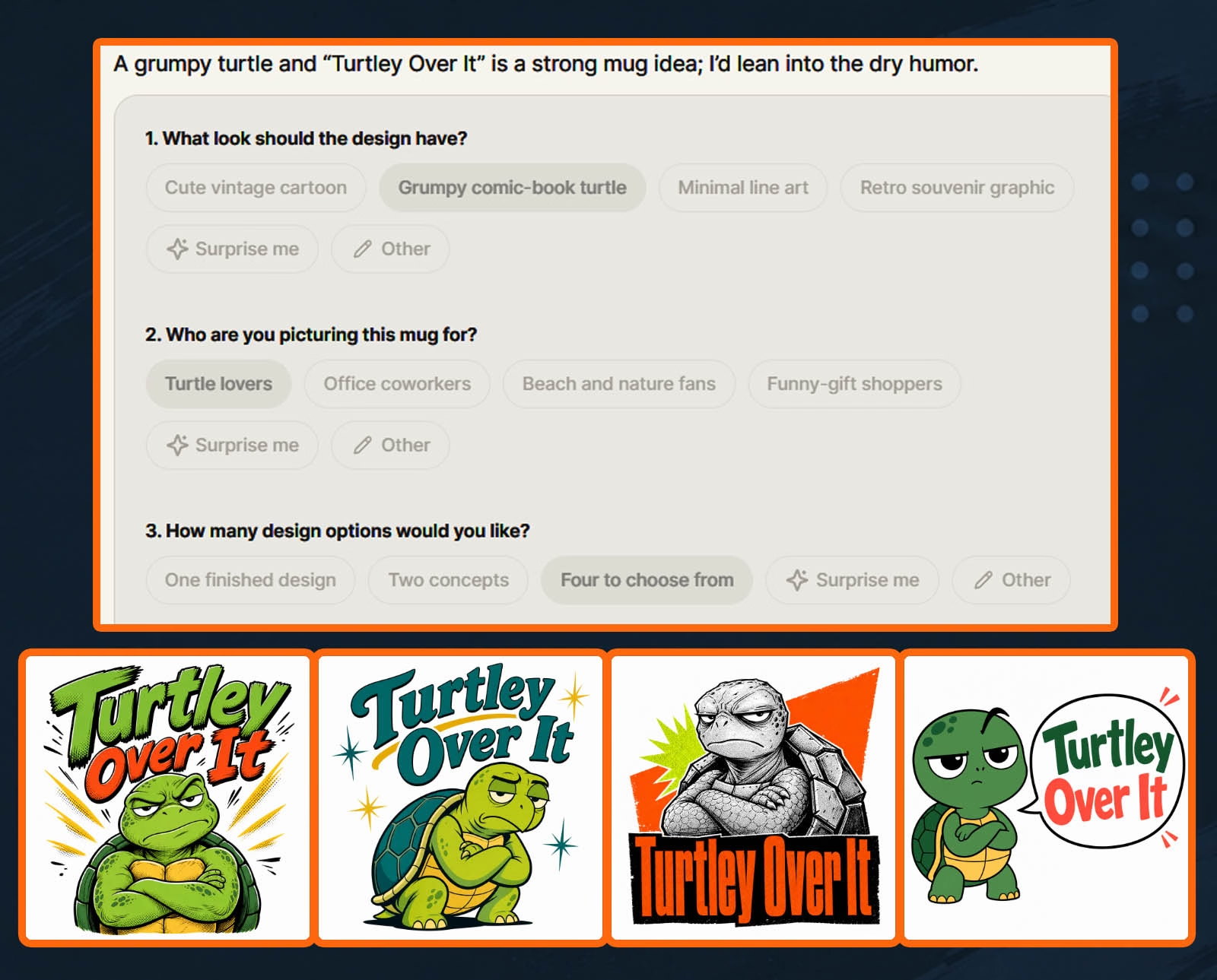
Some were better than others, but the important thing was that Creative Agent understood the basic idea without needing a detailed design brief. However, I had another plan. I didn’t want just any grumpy turtle. I wanted my boy, Sheldon, being his sweet, grumpy self! It was time to put Creative Agent to the next test!
Can Kittl Creative Agent Use Characters From Your Brand Kit?
Yes, Creative Agent can use your Brand Kit for visual guidance, but it couldn’t retrieve the exact Sheldon reference image directly from mine. It could work with my existing branding, but reproducing a specific character accurately required a more direct approach. Before starting, I had already set up my MikeLLane.com Brand Kit on Kittl with logos, fonts, colors, graphics, and my turtle mascots, Sheldon and Tater Tot. I will have a video tutorial and article on setting this up soon!
This is where I ran into the first issue, but I expected it. When I asked whether Creative Agent could use Sheldon in the design, I wanted an answer before it started generating anything. Instead, it went ahead and created an image. That’s an important distinction when you’re paying for AI generations with tokens! The best way to handle this problem is to start your prompt by telling Creative Agent to not create anything, just give me an answer. It will (usually) save you from burning tokens on unwanted image generations.
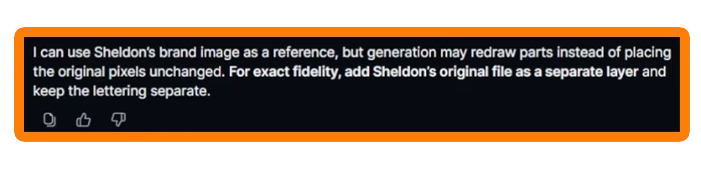
I asked again whether it could retrieve the exact Sheldon image stored in my Brand Kit (making sure to tell it not to generate an image but simply answer the question). Creative Agent explained that it could recreate images based on things within my Brand Kit, but couldn’t pull that exact reference from there, though. The better approach was to upload the actual image directly into the conversation or use it inside the Kittl editor.
My tip: If your design requires a specific mascot, logo illustration, or other artwork that needs to remain consistent, upload the exact reference image into Creative Agent rather than relying entirely on your Brand Kit. Use Brand Kit for reference and influencing designs, but when precision is needed, upload directly into Creative Agent.
Can It Create Consistent Character Designs?
Yes. For this experiment, the Sheldon-inspired result was close enough to continue testing. It held his colors (pulled from the reference sheet in my Brand Kit) and made him look close to what I envisioned. I could’ve refined the prompt and used my own image within the chat to better inform it, but for time’s sake, I used what it gave me. I also experimented with putting Sheldon into different poses, giving me additional graphics I could potentially use for the design or other marketing materials.
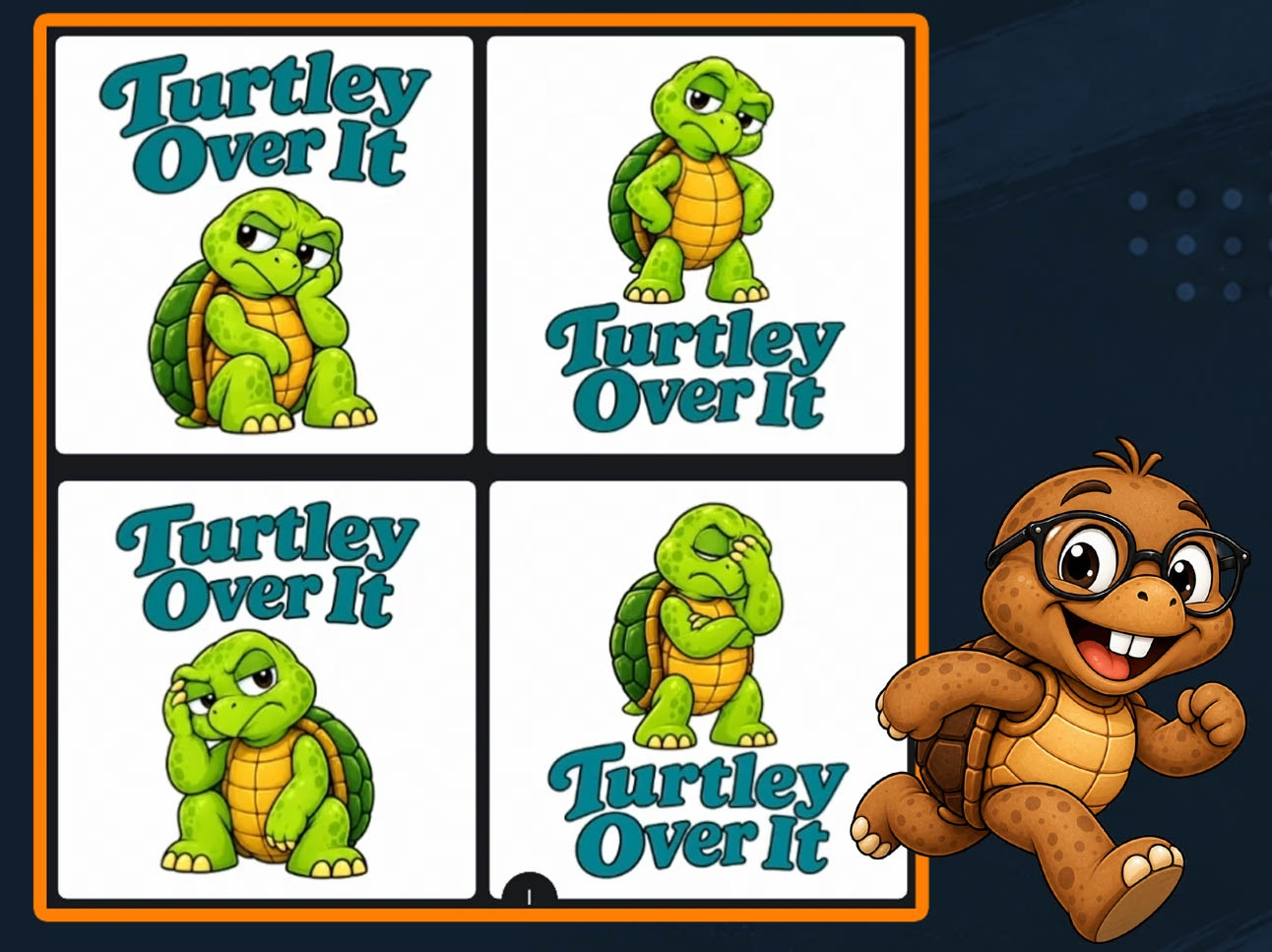
The takeaway here is that your Brand Kit can help maintain a consistent look, but you should still inspect the actual artwork carefully. If all else fails, use your own reference image right within the chat.
Can Kittl Creative Agent Create Realistic Product Mockups?
Yes. Creative Agent successfully placed my turtle design onto an existing mug mockup and later helped me create more customized listing images. However, I found that providing a reference image made a big difference. The first mockup was pretty basic and a plain mock I would never use. I prefer mocks that help you stand out in search, especially on Etsy, and a mug on a plain white background just looks cheap in my opinion. Technically, it did what I asked. But it wasn’t the kind of image I’d want representing a product in my Etsy shop.
So I uploaded one of my own blank mug mockups and instructed Creative Agent to place the design on it. That worked considerably better. To get the full experience, I wanted to see whether Creative Agent could create something a little more polished using my brand’s visual style. The initial result wasn’t quite what I had in mind. It used my brand colors, but the background looked too much like a flat digital graphic. I wanted a more realistic product scene.
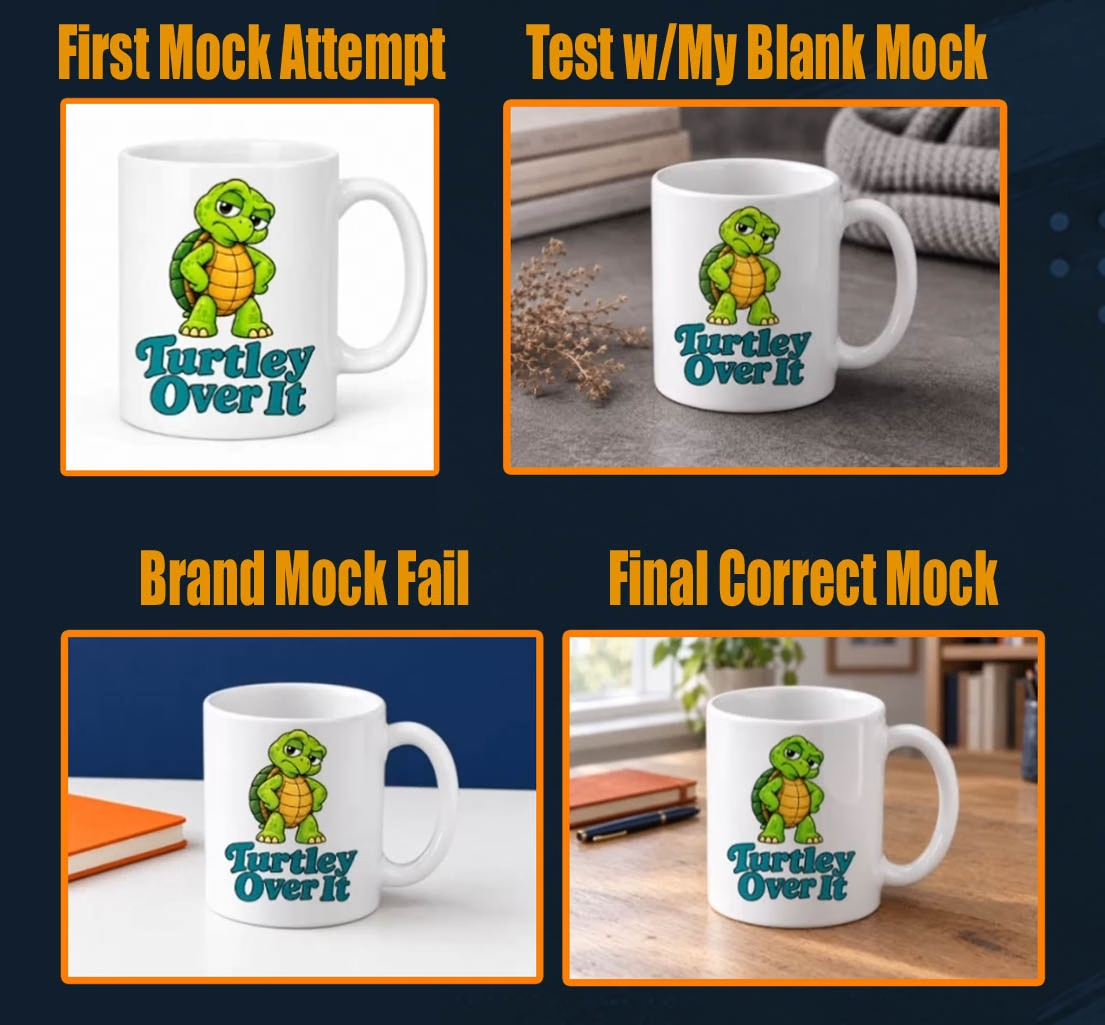
After giving it additional direction, I got a mockup that I actually liked. And now I was getting somewhere. The image had the kind of presentation I could use in a product listing, with subtle branded styling that could carry over into the rest of the images.
What I learned: Creative Agent can handle realistic mockups, but having your actual product or a reference mockup available gives you a much better starting point than asking it to invent everything. For sellers using print-on-demand providers, that also means checking the final image against the actual product being sold. A pretty picture doesn’t do much good if the mug, shirt, or whatever product you sell doesn’t look like what the customer will receive.
Can You Make Etsy Listing Images and Infographics?
Yes. I used Creative Agent to produce an Etsy-style product infographic showing my mug’s size and features, although the first attempt needed substantial improvement. I wanted an image that complemented the main listing photo while explaining the product specifications. For my test mug, that included an 11-ounce capacity and details such as dishwasher and microwave safety, along with BPA-free and lead-free claims. These were specifications I supplied for the example product, not something I wanted AI to invent.
Before generating the infographic, I asked Creative Agent what it recommended. That question cost me eight tokens. Eight tokens to ask a question? Okay, let’s hear this brilliant advice. I followed its suggestion, but the first infographic was a disappointment. The details were so small that they would have been difficult to read on a desktop screen, much less on a phone. And considering how many shoppers browse Etsy on their phones, that simply wasn’t going to cut it.
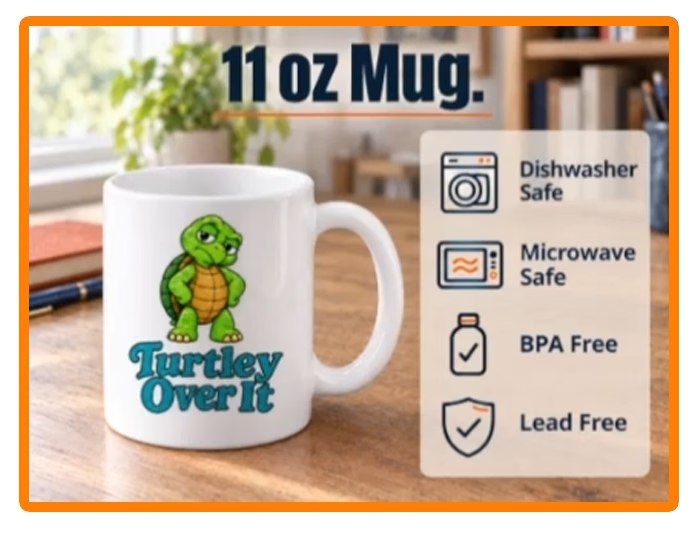
I went back and gave Creative Agent a more specific prompt. The next version was better, although I still needed to refine the layout because it became too blocky. This was a good reminder that AI-generated listing images still need human review. Don’t assume information is readable just because it appears in the image. And don’t trust AI to verify product specifications for you. Check the actual details from your supplier or the physical product. After fine-tuning the prompt again, I got an infographic that would work and match the same style as my first mock-up.
Can Creative Agent Generate Lifestyle Images for Etsy Products?
Yes. Creative Agent helped me create a lifestyle image featuring an annoyed woman holding my turtle mug. It took some additional prompting to get the composition I wanted, but the finished result fit the product’s personality. For this image, I wanted something a little different from a typical coffee mug mockup. Since the design said “Turtley Over It,” I figured the person holding it should look like she was having one of those days. You know the kind. When even your coffee is questioning your life choices.
The challenge was getting Creative Agent to understand that I was selling a mug, not a photograph of a woman. Some attempts didn’t give the product enough attention. Others were framed in ways that weren’t ideal for the listing images I wanted. I also ran into unwanted vertical compositions because I jumped the gun a bit. That was on me, though, not Creative Agent. After more adjustments, I got an image that featured the woman, the mug, and the design in a way that worked together.
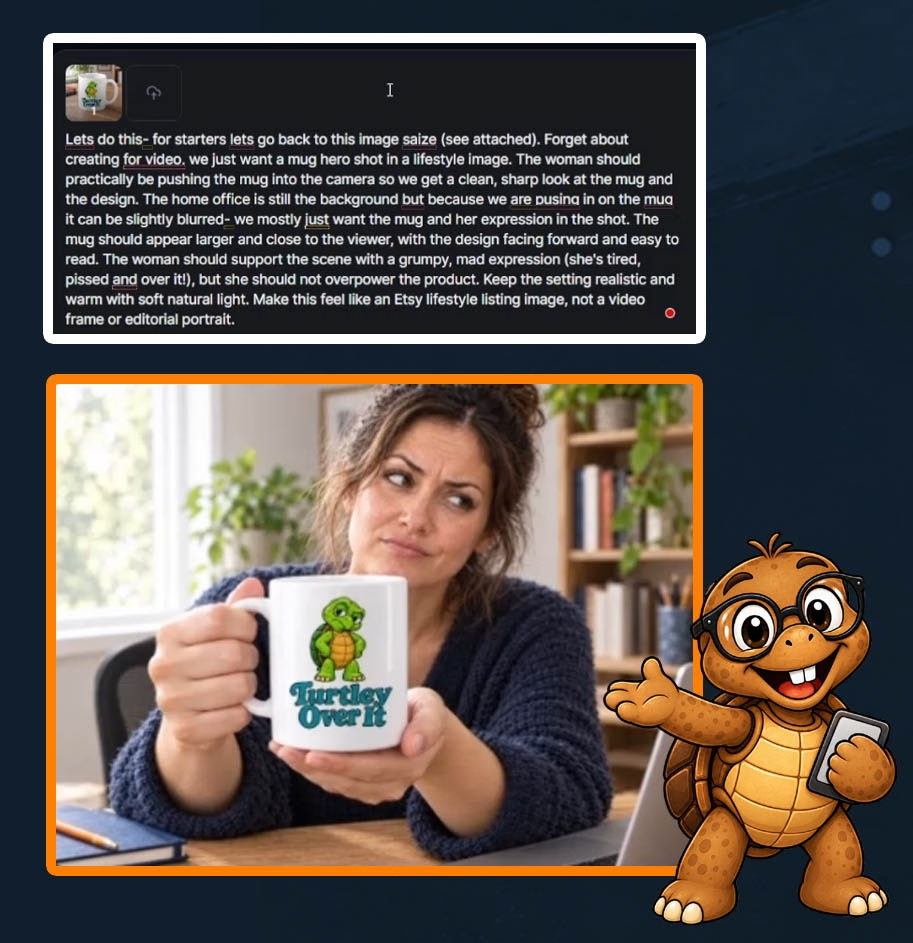
This was one of the more useful results from my experiment. It gave me another image for the hypothetical Etsy listing, but it also gave me something I could build on for a promotional video. And that’s where the next part of the test came in.
Can You Create Reusable Blank Product Mockups?
Yes. I was able to turn a finished lifestyle mockup into a reusable blank-mug image by asking Creative Agent to remove the artwork while preserving the rest of the scene. This might have been one of my favorite discoveries during the experiment. Once I had a lifestyle image I liked, I started thinking about how I could reuse it. I mean, why generate an entirely new scene for every mug design? Instead, I asked Creative Agent to keep the woman, background, lighting, and mug exactly the same while removing the printed design.
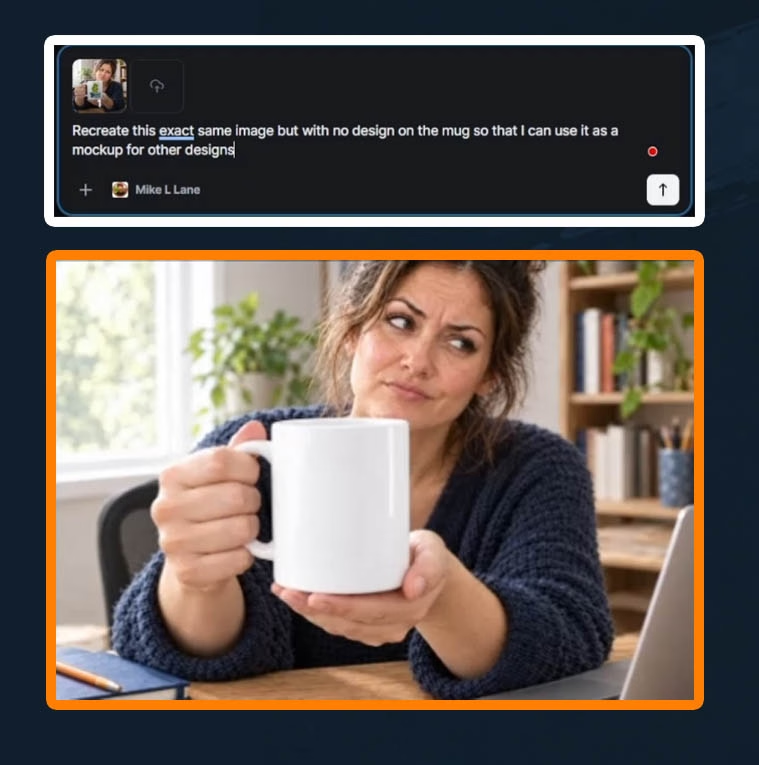
It worked! That gave me a blank product mockup I could potentially use again with another design. This same approach could be used for the main listing image I generated, as well as the infographic image. Imagine building a collection of branded lifestyle scenes, removing the printed artwork, and reusing those scenes with different product designs.
Things Went a Little Sideways…
I then tested the idea further by asking Creative Agent to place different artwork on the blank mug. And that’s when things went sideways again. Rather than following my instructions, one attempt recreated the image with the mug still blank. It basically handed me back the exact same image with no change at all. Even worse? That unwanted generation cost 46 tokens.
I honestly believe I had been working in the same session for too long, and this is why some of these hiccups started happening. Unfortunately, this didn’t dawn on me right away, lol. One thing to always keep in mind is that things can go a little topsy-turvy if you continue a long thread. Sometimes it’s better to start a new session fresh.
Can Kittl Creative Agent Turn Product Images Into Promotional Videos?
Yes. I eventually created a short promotional video featuring the same woman holding the turtle mug, but video generation was one of the more frustrating parts of the experiment. My goal was to animate the lifestyle image I’d already created. I wanted the woman to remain consistent, bring the mug closer to the camera, and give viewers a good look at the design. Simple enough, right?
Well, welcome to AI video generation, lol. Before creating the video, I asked Creative Agent for its opinion on my approach. Instead of answering, it generated another image I hadn’t requested. That one cost 93 tokens. Needless to say, I wasn’t thrilled, but I still hadn’t thought about changing sessions yet.
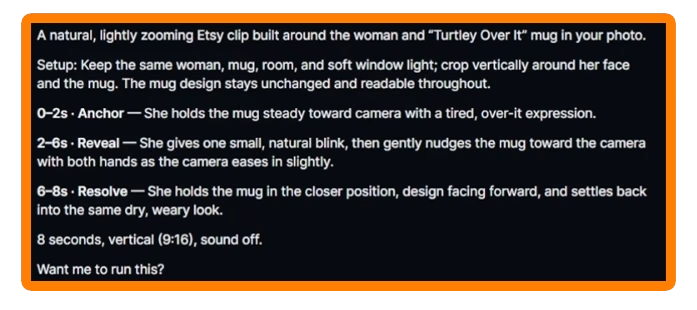
I became much more explicit about asking questions without allowing Creative Agent to generate anything. Eventually, I received a suggested video approach and prompt. But even then, the first attempts didn’t produce the result I wanted. Two generations failed without charging me tokens, which was certainly better than losing more of my balance.
When Is a Good Time to Start a New Session?
If you have been running a long session and start to get bad results, that is a good time to start a brand new session with Creative Agent. After all of my mishaps, I finally decided to start a fresh Creative Agent conversation and focus specifically on producing the video. That worked so much better! I provided the reference images and a more focused request, and Creative Agent successfully generated a short promotional video. The final result featured the same woman bringing the mug toward the camera, giving the design more attention. And that’s exactly what I wanted. You can catch a full demo of that in the video at the start of this article.
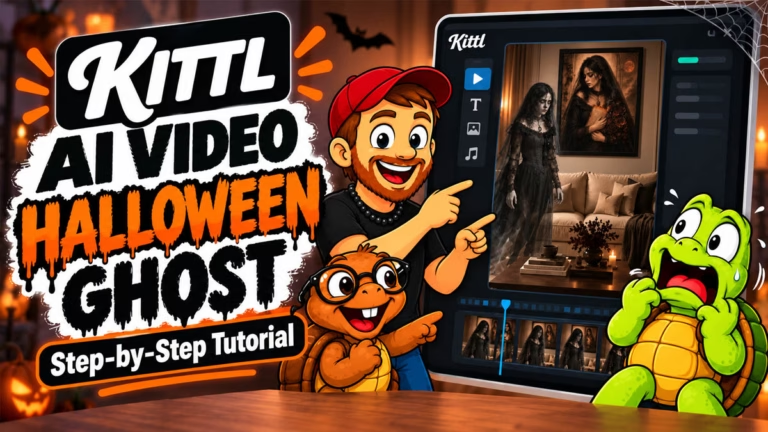
This reminded me of another Kittl AI video experiment I did, where I created a Halloween scene with a ghost emerging from framed wall art. That project also required multiple attempts and more control over the reference images. If you’re interested in experimenting with AI video beyond Creative Agent, check out my Kittl AI video tutorial featuring a Halloween ghost scene. I included the prompts, failures, and adjustments that eventually produced the finished video.
How Many Tokens Does Kittl Creative Agent Use?
My complete Creative Agent experiment consumed 1,031 tokens, taking my balance from 6,904 to 5,873. That covered the original designs, mockups, image revisions, lifestyle photographs, video attempts, completed video, and listing copy.
Here’s my total:
| Token measurement | Amount |
|---|---|
| Starting token balance | 6,904 |
| Ending token balance | 5,873 |
| Total tokens used | 1,031 |
That’s not a fixed price for creating a mug listing. It’s simply what this particular experiment cost me, including the mistakes and extra testing. For everything I ended up with, I don’t think the overall total was that bad. I also know that the more I play with Creative Agent, the better I’ll get at it. The best thing you can do is practice creating prompts, and that generally ends up saving you tokens/credits in the future. If you want to learn better prompting skills for any AI platform you use, check out AI Dominance. It’s a completely free community that helps you to hone those skills!
Why Did Some Questions Cost More Tokens Than Others?

The token cost of my text-only interactions varied noticeably, and I couldn’t identify a confirmed reason from the experiment alone. I recorded questions that cost eight tokens and another that cost 17 tokens, even though I wasn’t asking Creative Agent to generate an image or video. But something interesting happened near the end. After I moved to a fresh conversation, Creative Agent gave me an Etsy listing title, description, and tags for just one token. One token! Now that’s a price I can get behind.
The difference made me wonder whether the length or complexity of an ongoing conversation might affect token usage. That’s a theory, not something I’ve confirmed. According to Kittl’s Creative Agent documentation, simple conversations use fewer tokens than creative generations, while the total cost depends on the work Creative Agent performs. Kittl also explains that it cannot display the complete cost of a request in advance because Creative Agent determines which tools to use while processing it. The company’s broader AI token documentation explains how token usage varies by feature and model.
What those explanations don’t tell me is precisely why one of my questions cost 17 tokens while a later response containing several pieces of listing copy cost one. That’s something I’d like to investigate further. This is still in the testing phase, and there may be some tweaks and adjustments made as they test it further. For now, my practical approach would be to keep an eye on the token balance, make my instructions clear, and consider starting a focused new chat when moving to a completely different task. I can’t promise that starting a new chat saves tokens, but it worked well when I needed to get my video generation back on track.
Can Kittl Creative Agent Write Etsy Titles, Descriptions, and Tags?
Yes. Creative Agent generated a proposed Etsy title, product description, and keyword tags for my mug, even though I hadn’t explicitly asked for every piece of that information. For my final test, I gave Creative Agent the images we’d created and asked it to help develop the listing information. It produced a title, a product description, and suggested tags. Some of the copy was useful. Some of it definitely needed work. The title, in particular, wasn’t something I’d publish as written. But I wasn’t expecting it to deliver a perfectly optimized Etsy listing. I wanted to know whether it could give me a useful starting point. And it did.
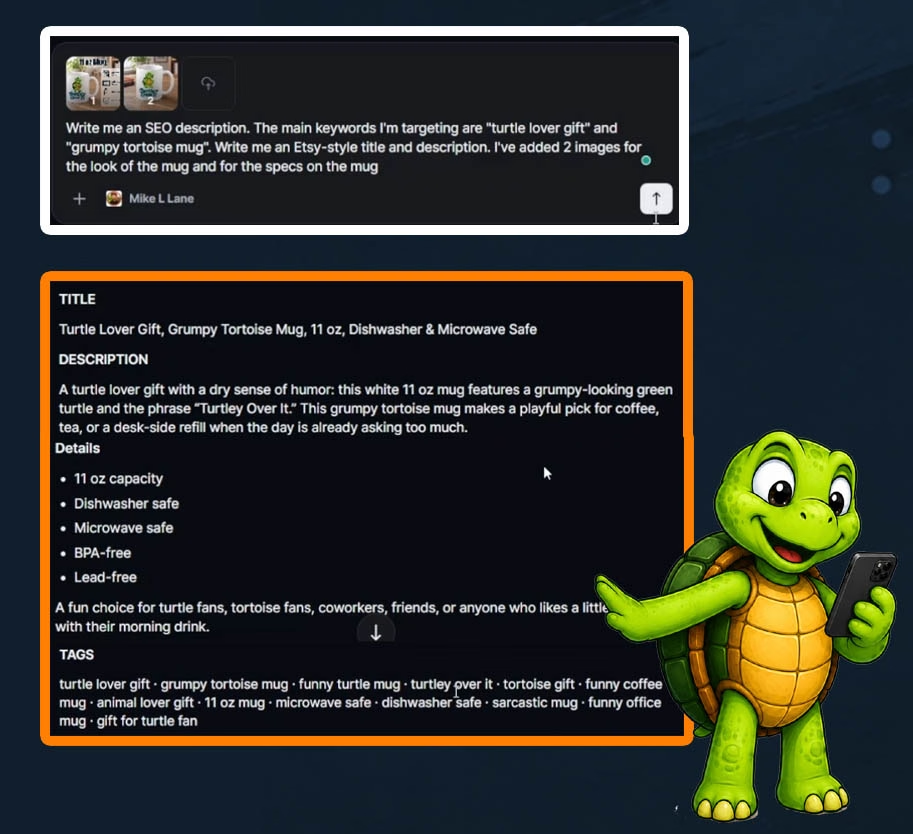
The biggest surprise was that this response cost just one token. That was one of the best values I saw throughout the experiment, lol! However, I would never recommend publishing AI-generated Etsy SEO without reviewing it. You still need to research relevant keywords, verify product details, and make sure the title, tags, and description actually represent what you’re selling. AI can help brainstorm ideas, but it shouldn’t replace your judgment or keyword research.
Is Kittl Creative Agent Worth Using for Etsy and Print-on-Demand Sellers?
I think Kittl Creative Agent is worth testing if you regularly need designs, product mockups, listing images, or promotional content. My experiment showed that it can handle several connected creative tasks, although the results still require review and sometimes significant correction. What impressed me most wasn’t any single image. It was the ability to start with one idea and keep building on it.
I went from a grumpy turtle phrase to an actual design concept, then to mug mockups, an infographic, lifestyle photography, a reusable blank mockup, a short video, and proposed listing copy. All from a conversation.
But there were trade-offs. Some generations didn’t follow instructions. Some cost tokens I hadn’t intended to spend. And sometimes I needed to be more specific than the conversational workflow initially suggested. That said, I can see the potential, particularly for people who have good product ideas but struggle with the creative or marketing side of selling online. Just remember that an AI-generated mockup is not proof that the actual product looks that way. If you’re selling physical items, product accuracy still matters. And if you’re producing marketing content, the prettiest graphic in the world won’t help much if it misrepresents your product.
Frequently Asked Questions
Is Kittl Creative Agent free to use?
Kittl Creative Agent is available on Kittl’s Free plan, but it uses AI tokens. The number of tokens available depends on your plan, and additional usage may require a paid subscription or token purchase.
Can you use Kittl Creative Agent for commercial products?
Kittl permits commercial use of generated AI images under its paid-plan licensing terms. Free-plan AI images are intended for personal, noncommercial use. Always review Kittl’s official documentation and applicable licensing conditions before selling your designs.
Can Creative Agent make Etsy product listing photos?
Yes. Creative Agent can create product mockups, lifestyle photography, listing infographics, and other images suitable for an Etsy listing. You’ll still need to verify that the images accurately represent the product.
Does Kittl Creative Agent remember previous conversations?
Creative Agent remembers information within the current conversation, but separate chats don’t currently share that same conversation history. You can apply your Brand Kit to new chats and upload reference images when needed.
Can Kittl Creative Agent generate videos from images?
Yes. Creative Agent can use reference images to create short promotional videos and product content. Results depend on the request, the models selected, and how clearly you describe the desired motion.
Are failed Kittl AI generations charged tokens?
Kittl states that failed or incomplete generations are refunded automatically. That matched the two failed video attempts in my experiment. However, an unwanted but successfully completed generation is a different situation, and I was charged for those.
Can Creative Agent use an exact mascot or logo from your Brand Kit?
Not necessarily. In my test, Creative Agent could reference my brand’s visual style but couldn’t retrieve the exact Sheldon illustration I wanted from the Brand Kit. Uploading the specific image into the conversation was the recommended workaround.
Does starting a new Creative Agent chat save tokens?
I haven’t confirmed that it does. In my experiment, a fresh chat produced a successful video and a later low-cost text response, but that isn’t enough evidence to establish a general rule about token savings. Definitely worth testing, though.
Can beginners use Kittl Creative Agent without writing complicated prompts?
Yes. That’s one of its main advantages. You can start with a simple idea and answer the follow-up questions. However, learning to give clear directions becomes increasingly important when dealing with precise product details or expensive video generations.
My Final Verdict on Kittl Creative Agent
I started this experiment with a rough coffee mug idea and 6,904 AI tokens. By the end, I had a complete turtle-themed design, multiple mockups, Etsy-style listing images, a promotional video, and suggested listing copy. And I still had 5,873 tokens left. For a total of 1,031 tokens, I think I got quite a bit out of the experience. It was easy to use, and all I had to do was ask and answer questions to get what I wanted.
Was everything perfect? As with any AI platform, hell no, lol. There were frustrating moments, unexpected generations, and a few times when I wondered whether Creative Agent was actually listening to me. But the finished results showed me why a tool like this could be useful. I particularly liked that I could continue refining an idea without switching between a bunch of unrelated tools.
At the same time, I wouldn’t hand over complete control of my product listings or marketing material to any AI system. You still need to know your product, review the results, and recognize when something isn’t good enough. My biggest takeaway is that Creative Agent can do a lot of the heavy lifting, but you still have to steer the ship. And I suspect that as Kittl continues improving the feature, we’ll see some of these frustrations addressed.
For now, if you’re curious about what Creative Agent can do, I’d recommend starting with a small project and keeping an eye on those tokens. You can try Kittl and follow along with the experiment in my video.
Affiliate disclosure: I may earn a commission if you make a qualifying purchase through my Kittl link, at no additional cost to you.